
Developers
Global architecture
OpenTrackEditor tries to follow clean architecture as much as possible.
Some inconsistencies may occur, and you’re more than welcome to fix them and document your changes.
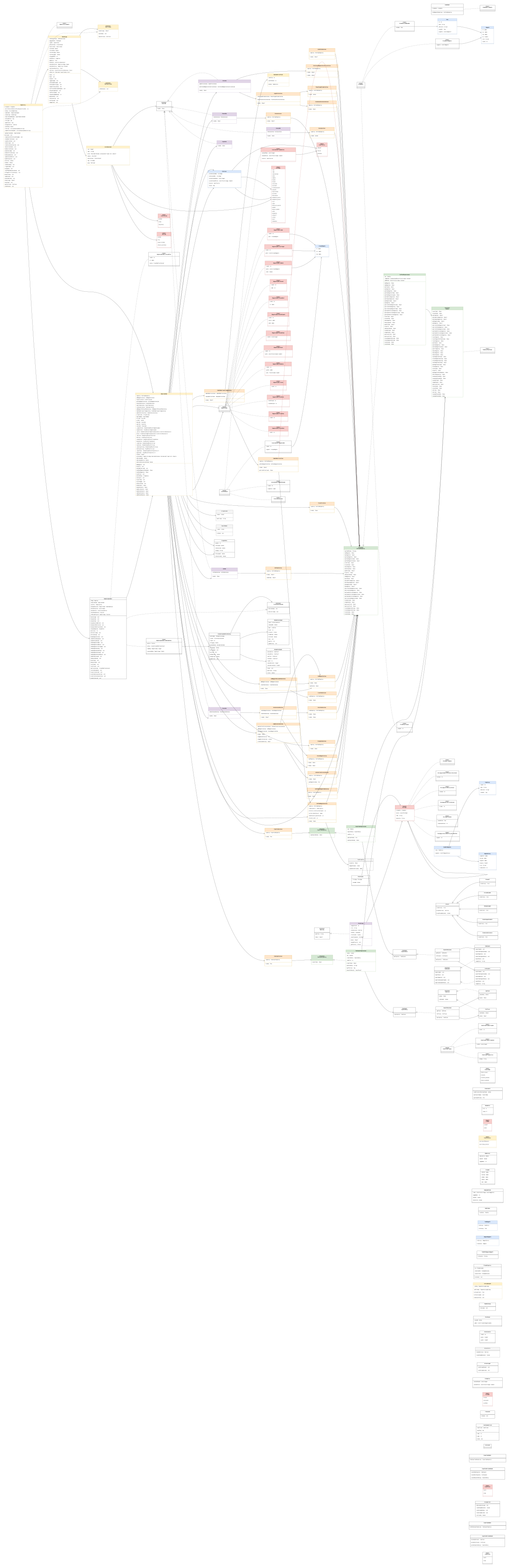
Here is the class diagram of the entire app :
Tool Implementation
How to implement different tools :
Recommended folder layout for a single tool. Keep domain/usecase/model separate from presentation (dialogs/UI) and place the main tool implementation at the top level of the tool's package.
└───feature_map_editor
    └───tools
        └───dummyTool
            │   DummyTool.kt
            │
            ├───domain
            │   ├───model
            │   │       DummyParams.kt
            │   │       DummyResult.kt
            │   │
            │   └───usecase
            │           DummyUseCase.kt
            │
            └───presentation
                    DummyDialog.kt
What this file is for: the main tool class is the entry point for your feature. It
implements EditorTool,
orchestrates user interaction (reads the current EditState), opens the tool dialog if needed,
calls the domain use case,
and notifies the UI of results via ToolResultListener.
Keep UI out of the use case: the tool class may call a dialog (presentation), but the business logic must live in the use case.
// src/.../tools/dummyTool/DummyTool.kt
package com.minapps.trackeditor.feature_map_editor.tools.dummyTool

class DummyTool @Inject constructor(
    val dummyUseCase: DummyUseCase,
) : EditorTool {

    /* Executed when the tool is clicked */
    override suspend fun launch(
        listener: ToolResultListener,
        uiContext: ToolUiContext,
        isSelected: Boolean
    ) {
        // 1) Read current editor state (selection, etc.)
        val dummyData = uiContext.getEditState()

        // 2) Show the tool UI (dialog) to gather parameters from the user
        val selectedParameters = uiContext.showDialog(DummyDialog(dummyData))

        // 3) If the user provided parameters, run the domain logic
        if (selectedParameters != null) {
            val result = dummyUseCase(selectedParameters)

            // 4) Notify the rest of the app that the tool finished with a result
            listener.onToolResult(ActionType.NONE, result)
        }
    }
}
Purpose: keep all track/waypoint/database changes here.
Return a result object describing success/failure and the UI update that should happen
(WaypointUpdate or similar).
// src/.../tools/dummyTool/domain/usecase/DummyUseCase.kt
package com.minapps.trackeditor.feature_map_editor.tools.dummyTool.domain.usecase

class DummyUseCase @Inject constructor(
    private val repository: EditTrackRepository
) {
    operator fun invoke(dummySelection: DummyParams) : DummyResult {
        // Example of domain logic
        val succeeded = true
        val trackId = 0
        val updateUIMethod = WaypointUpdate.Cleared(trackId)

        // Return a result that tells the UI what to update
        return DummyResult(succeeded, updateUIMethod)
    }
}
If your tool needs parameters from the user (filters, thresholds, confirmation), implement a dialog that
returns a parameters object.
The dialog should implement ToolDialog<TParams> — the uiContext will call
show() and await the response.
// src/.../tools/dummyTool/presentation/DummyDialog.kt
package com.minapps.trackeditor.feature_map_editor.tools.dummyTool.presentation

class DummyDialog(val dummyData: EditState) : ToolDialog {

    // The dialog title shown in the UI
    override val title: String = "Dummy Track"

    /* Show dialog and return selected params (suspendable) */
    override suspend fun show(context: Any): DummyParams? {
        // Replace this stub with a real dialog widget that captures user input
        val dummySelection = DummyParams(5, true)
        return dummySelection
    }
}
Params: passed from the dialog to the tool/use case.
Result: returned by the use case and contains both success state and UI update
instructions.
// src/.../tools/dummyTool/domain/model/DummyParams.kt
package com.minapps.trackeditor.feature_map_editor.tools.dummyTool.domain.model

data class DummyParams(
    val a: Int = 0,
    var b: Boolean = false,
)

// src/.../tools/dummyTool/domain/model/DummyResult.kt
package com.minapps.trackeditor.feature_map_editor.tools.dummyTool.domain.model

data class DummyResult(
    var succeeded: Boolean = false,
    var update: WaypointUpdate,
)
ActionType
Every tool must appear in the global ActionType enum so the toolbox can show it. Choose icon,
label,
selection behavior (SelectionCount), and the logical tool group (ToolGroup).
// src/.../core/domain/type/ActionType.kt
package com.minapps.trackeditor.core.domain.type

enum class ActionType(
    val icon: Int?, // Icon drawable resource id
    val label: String?, // localized label
    val selectionCount: SelectionCount?, // NONE / ONE / MULTIPLE
    val group: ToolGroup? = ToolGroup.NONE,
    val deselect: Boolean = false, // whether clicking deselects tracks/points
) {
    DUMMY_TOOL(R.drawable.dummy, "Dummy Tool", SelectionCount.NONE, ToolGroup.TRACK_EDITING),
}
// selection / group enums (for reference)
package com.minapps.trackeditor.core.domain.util

enum class SelectionCount { NONE, ONE, MULTIPLE }

enum class ToolGroup { NONE, ALL, FILE_SYSTEM, TRACK_EDITING }
Inject the tool into MapViewModel and include it in the _actions map so the
toolbox will render it.
Map the ActionType to the tool instance as an executor in the ActionDescriptor.
// src/.../feature_map_editor/presentation/MapViewModel.kt
@HiltViewModel
class MapViewModel @Inject constructor(
  private val dummyTool: DummyTool,
) : ViewModel() {

  init {
    // 1) The list of types you want displayed in the toolbox
    val tools = listOf(ActionType.DUMMY_TOOL)

    // 2) Build the DataDestination -> ActionDescriptor map consumed by the UI
    _actions.value = mapOf(
      DataDestination.EDIT_TOOL_POPUP to tools.map { type ->
        val action = actionHandlers[type]
        val executor: EditorTool? = when (type) {
          ActionType.DUMMY_TOOL -> dummyTool
          else -> null
        }
        ActionDescriptor(
          type.icon,
          type.label,
          action,
          executor,
          type.selectionCount,
          type,
          type.group,
        )
      }
    )
  }
}
After this the toolbox will show the tool icon and launching it will call
EditorTool.launch().